import torch
print(torch.iinfo(torch.int8))
iinfo(min=-128, max=127, dtype=int8)This is completely based on Quantization Fundamentals
For the code part, you can checkout this link
Quantization helps to reduce the size of the model with little or no degradation.
Current model compression technique:-
Pruning:-remove connections that do not improve the model.
Knowledge Distillation:- Train a smaller model(Student) using the original model(Teacher). Cons:-You need to have enough hardware to fit both teacher as well student both.
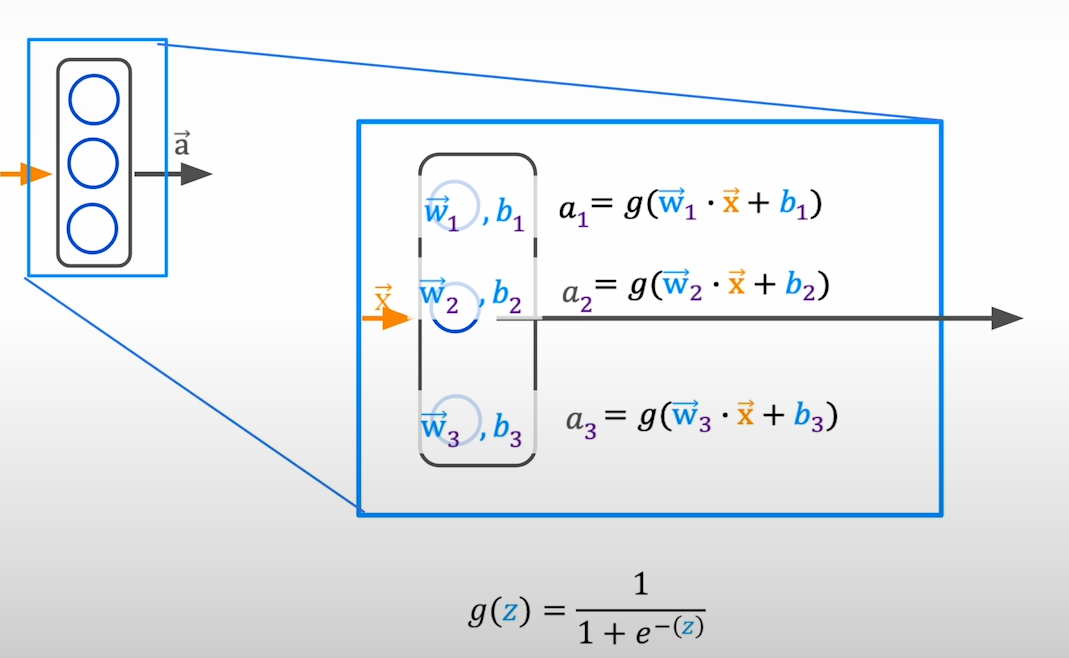
You can quantize weights.
You can quantize activations that propagate through the layers of neural network
Idea:Store the parameters of the model in lower precision
Integer
Unsigned Integer (8-bit):- Range is [0, 255] [0, 2n-1] (All 8 bits are used to represent the number)
Signed Integer (8-bit):- Range is [-128, 127] [-2n-1, 2n-1-1] (7 bits are used to represent the number and the 8th bit represent the sign 0:Positive 1:Negative)
| Data Type | torch.dtype | torch.dtype alias |
|---|---|---|
| 8-bit signed integer | torch.int8 | |
| 8-bit unsigned integer | torch.uint8 | |
| 16-bit signed integer | torch.int16 | torch.short |
| 32-bit signed integer | torch.int32 | torch.int |
| 64-bit signed integer | torch.int64 | torch.long |
import torch
print(torch.iinfo(torch.int8))iinfo(min=-128, max=127, dtype=int8)Floating Point
3 components in floating point: Sign:- positive/negative (always 1 bit) Exponent(range): impact the representable range of the number Fraction(precision): impact on the precision of the number
Comparison Of Data Types
| Data Type | Precision | Maximum |
|---|---|---|
| FP32 | Best | ~10+38 |
| FP16 | Better | ~1004 |
| BF16 | Good | ~1038 |
| Data Type | torch.dtype | torch.dtype alias |
|---|---|---|
| 16-bit floating point | torch.float16 | torch.half |
| 16-bit brain floating point | torch.bfloat16 | |
| 32-bit floating point | torch.float32 | torch.float |
| 64-bit floating point | torch.float64 | torch.double |
import torch
print("By default, python stores float data in fp64")
value = 1/3
tensor_fp64 = torch.tensor(value, dtype = torch.float64)
tensor_fp32 = torch.tensor(value, dtype = torch.float32)
tensor_fp16 = torch.tensor(value, dtype = torch.float16)
tensor_bf16 = torch.tensor(value, dtype = torch.bfloat16)

print(f"fp64 tensor: {format(tensor_fp64.item(), '.60f')}")
print(f"fp32 tensor: {format(tensor_fp32.item(), '.60f')}")
print(f"fp16 tensor: {format(tensor_fp16.item(), '.60f')}")
print(f"bf16 tensor: {format(tensor_bf16.item(), '.60f')}")

print(torch.finfo(torch.bfloat16))
By default, python stores float data in fp64
fp64 tensor: 0.333333333333333314829616256247390992939472198486328125000000
fp32 tensor: 0.333333343267440795898437500000000000000000000000000000000000
fp16 tensor: 0.333251953125000000000000000000000000000000000000000000000000
bf16 tensor: 0.333984375000000000000000000000000000000000000000000000000000
finfo(resolution=0.01, min=-3.38953e+38, max=3.38953e+38, eps=0.0078125, smallest_normal=1.17549e-38, tiny=1.17549e-38, dtype=bfloat16)PyTorch Downcasting
when a higher data type converted to a lower data type, it results in loss of data
Advantages:
Disadvantages:
Use case:
target_dtype = torch.float16 or torch.bfloat16
model = model.to(target_dtype)
model = model.half() for fp16
model = model.bfloat16() for bfloat16
Always use bfloat16 instead of float16 while using pytorch-cpu
FP32 is default in pytorch
model.get_memory_footprint()/1e+6
torch.set_default_dtype(desired_dtype) # By doing so we can directly load the model in desired dtype without loading in full precision and then quantizing it
set it back to float32 to avoid unnecessary behaviors
Quantization refers to the process of mapping a large set to a smaller set of values.
How do we convert the FP32 weights to INT8 without losing too much information??
How do we get back our original tensor from the quantized tensor?
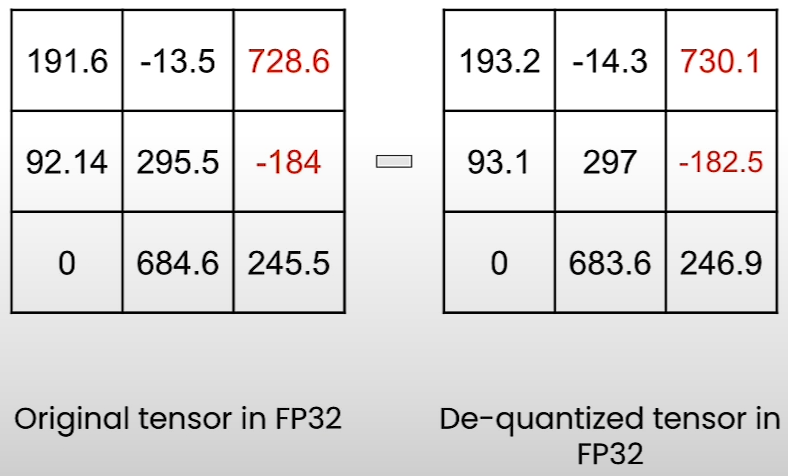
Quantize Using Quanto Library
Uses of the Intermediate State
Linear Quantization
Even if it looks very simple, it is used in many SOTA quantization methods:
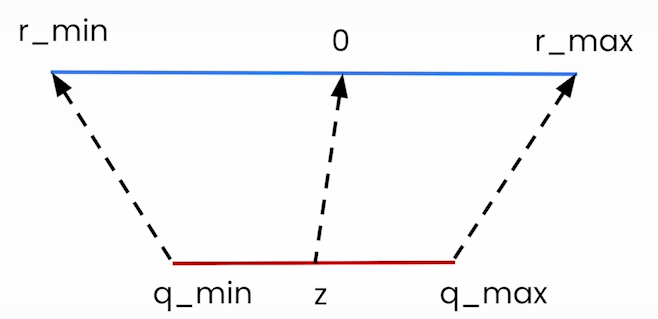
Recent SOTA quantization methods:-
More recent SOTA quantization methods for 2-bit quantization
All are open-source
Some Quantization Methods require calibration (from above)
Some Quantization Methods require Adjustments
Many of these methods were applied to LLMs, but if we want then we can apply to other type of models by making few adjustments to the quantization methods
Some methods can be applied without making adjustments
Other approaches are data-dependent
There are distributors on HuggingFacewhich gives a quantized version of popular models (TheBloke)
Checkout HuggingFace Open LLM leaderboard to see how these quantized models are performing
Benefits of fine-tuning a quantized model:
Fine tune with Quantization Aware Training (QAT)